← Elevate Aura  ·  HIMS & AuraPACS clinical software Chennai, India · WhatsApp
For admissions desks and ward in-charges

Hospital bed management software that shows every ward and every bed as it is right now.

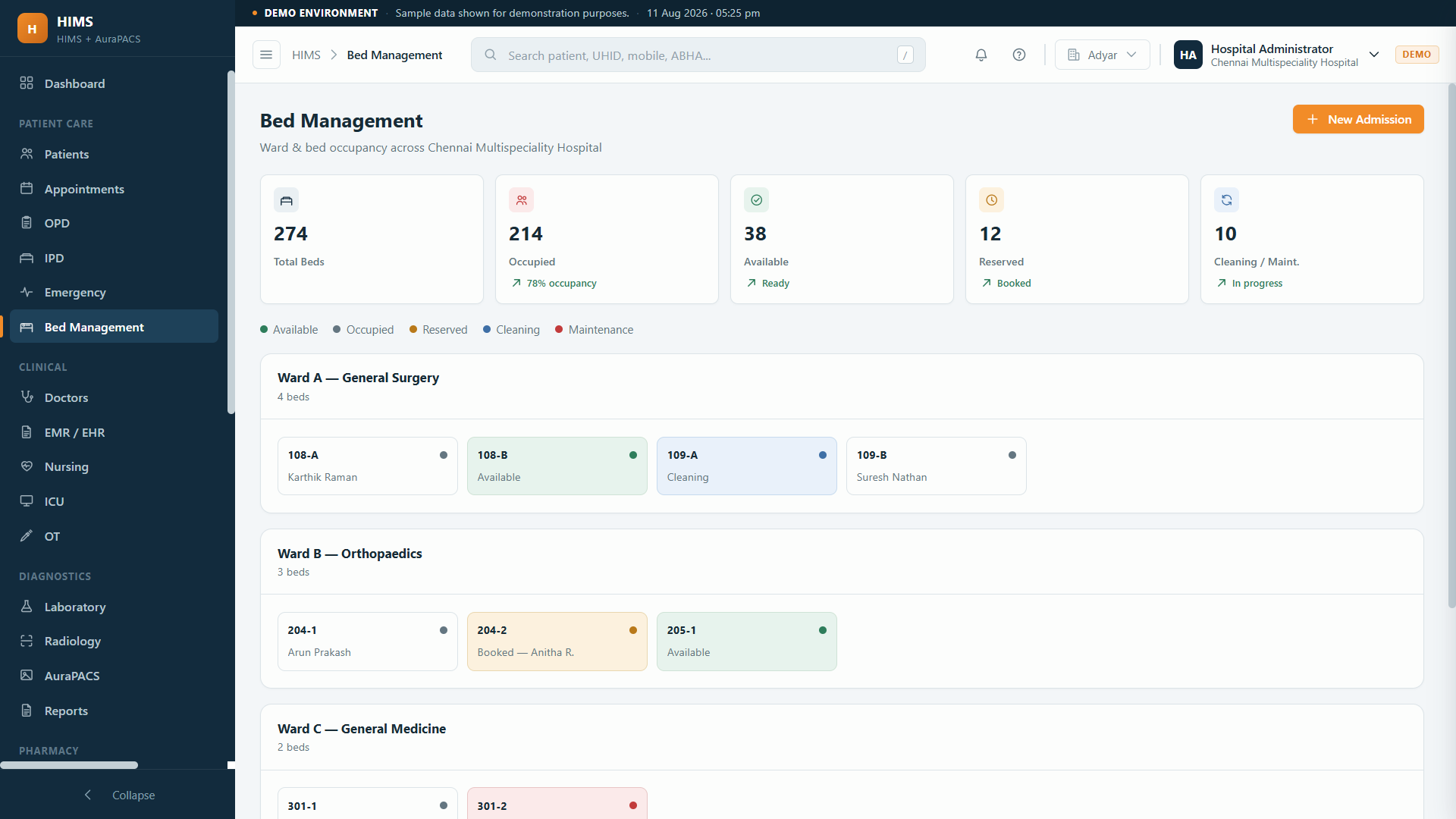
HIMS keeps a live board of every ward and bed: who is in it, since when, and which beds are free. Admissions allocate from it, transfers and ICU step-downs move patients across it, and discharge releases the bed back to the front desk.
Live occupancy across every wardTransfers and ICU step-down in one moveOccupancy on the hospital dashboard
his.elevateaura.co.in/beds
HIMS bed management board showing ward-wise bed occupancy with occupied and free beds
In one sentence

What hospital bed management software does

Hospital bed management software keeps one live picture of bed occupancy across the hospital, so that admission, transfer and discharge all update the same board. In HIMS the board is part of the inpatient workflow: a bed is allocated when the admission is raised, moved when the patient is transferred, and released when the discharge is completed, and the free-bed count feeds the hospital dashboard.

The board is organised by ward and bed type, general ward, private room, ICU and so on, so the admissions desk can answer a family or a referring doctor without phoning the ward. Because the bed belongs to an admission, room charges post to the IP bill for the days actually occupied.

Why a bed register is not enough

The ward knows, the front desk guesses, the patient waits on a trolley.

Bed occupancy changes every hour. A register updated at the end of a shift is always wrong.

Bed promised twice

The front desk allots a bed from yesterday's register while the ward filled it from casualty overnight.

Transfers not recorded

A patient moved from ICU to the ward is still shown in ICU, so the ICU looks full and the ward looks empty.

Discharged but not released

The patient left at noon; the bed is marked free at the evening handover, after a new admission was turned away.

Room charges by memory

Nobody is sure whether the patient was in the private room for three days or four, so the bill is argued at discharge.

No hospital-wide view

Management asks how many beds are free right now, and the answer is a round of phone calls to each ward.

How a bed moves

Allocation, transfer, release.

01

Free bed visible

Admissions desk sees free beds by ward and type on the board.

→
02

Allocated at admission

The bed is tied to the admission and shows as occupied for everyone.

→
03

Transfer

Ward to ICU, or ICU step-down to the ward, moves the patient and both beds update.

→
04

Charges post

Room and bed charges accrue to the IP bill for each bed and day.

→
05

Released at discharge

Discharge frees the bed, and the dashboard count changes at once.

What is included

The bed board and what connects to it.

🛏The board

  • Ward-wise bed layout
  • Bed types: general, semi-private, private, ICU
  • Occupied, free and reserved status
  • Patient, consultant and admission date per bed

🔄Movement

  • Allocation at admission
  • Ward-to-ward transfers
  • ICU admission and step-down
  • Release at discharge

₹Billing link

  • Room charges per bed type and day
  • Charges follow the transfer
  • Running IP bill
  • Package room entitlements

📊Dashboard

  • Free beds by ward on the live dashboard
  • OP, IP, beds and collections in one view
  • ICU beds with live vitals
  • Casualty admissions waiting for a bed

See the full inpatient workflow →

In practice

What changes on the admissions desk.

A referral call from a clinic

Workflow: The desk opens the board, sees two private rooms free on the second floor and confirms the admission on the phone.

Result: No call to the ward, no promise that cannot be kept.

An ICU step-down

Workflow: The intensivist marks the patient fit for the ward; the transfer moves the admission to a ward bed and frees the ICU bed.

Result: The ICU bed is available to casualty within the minute.

A discharge at midday

Workflow: The final bill is settled and the discharge completes, which releases the bed on the board.

Result: The next admission is allocated the same afternoon.

Management review

Workflow: The dashboard shows occupied and free beds by ward alongside OP numbers and collections.

Result: One screen instead of a round of calls.

Who it is for

Any hospital where a bed is a scarce thing.

🏥
Multi-specialty hospitals

Many wards, one board.

🏞
Nursing homes

A handful of beds that must not be double-booked.

🚑
Casualty-led hospitals

Admissions arriving at all hours.

💓
ICU teams

Step-down and step-up moves tracked.

👤
Admissions desks

Answer availability without a phone call.

The honest comparison

Tracking beds, three ways.

 
Paper registers and Excel
Standalone billing software
HIMS by Elevate Aura
Occupancy
Ward register, updated per shift
Not tracked
Live, updated by admission and discharge
Transfers
Written in two registers
Not covered
One move updates both beds
Room charges
Counted at discharge
Typed in
Posted per bed and day to the IP bill
Hospital-wide view
Phone calls
None
Free beds by ward on the dashboard
ICU
Separate register
Not covered
ICU beds on the same board, with live vitals
Questions

Hospital bed management software, answered.

Is bed management a separate module?

It is part of the HIMS inpatient workflow. Beds are allocated when an admission is raised and released when the discharge completes, so the board stays current without a separate register. See IPD software.

Can we set up our own wards and bed types?

Yes. Wards, room categories and the beds in each are configured to match your building during setup, so the board looks like your hospital rather than a generic layout.

How do transfers between wards work?

A transfer moves the admission from one bed to another. The old bed becomes free and the new bed becomes occupied in the same action, and room charges change from the date of transfer.

Does the ICU appear on the same board?

Yes. ICU beds are part of the board and step-up or step-down moves are ordinary transfers. The ICU module also shows live vitals per bed. See ICU management software.

How does housekeeping know a bed is free?

The bed shows as released on the board the moment the discharge completes, so the ward and housekeeping can turn it around before the next admission is allocated. How the ward team coordinates the cleaning itself stays with your process.

Can management see occupancy without logging into the ward screen?

Yes. The hospital dashboard in HIMS shows OP, IP, beds and collections together, so occupied and free beds by ward are visible alongside the day's numbers.

Keep exploring

Related HIMS modules

Let's talk about your requirement.

Tell us how you work today. We will show you what the platform would look like for you, and give you a clear scope and timeline.

Founder-led · Chennai, India · Built and supported by the person who wrote it