← Elevate Aura  ·  HIMS & AuraPACS clinical software Chennai, India · WhatsApp
For OPD front desks

Hospital queue management software that gives every doctor a live token queue, not a corridor headcount.

HIMS issues tokens to walk-ins, checks appointments in against their slot, and orders both into a live queue for each doctor. The front desk sees waiting counts on the OPD dashboard and the doctor sees who is next from the consulting room.
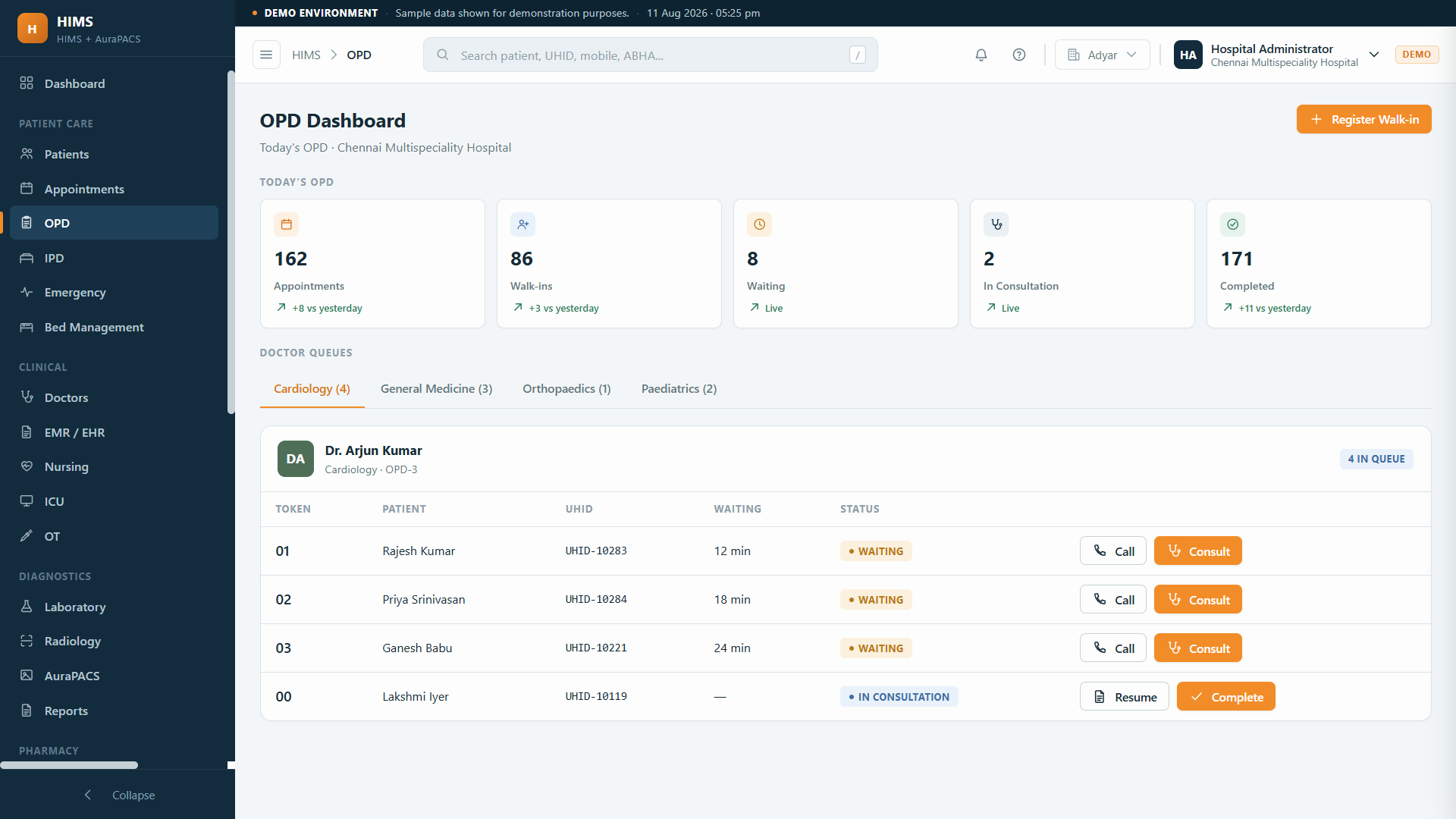
Tokens for walk-ins, check-in for appointmentsLive queue per doctor and departmentWaiting count on the OPD dashboard
his.elevateaura.co.in/opd
HIMS OPD dashboard with live doctor queues, tokens issued and patients waiting
In one sentence

What hospital queue management software does

Hospital queue management software replaces the token pad and the corridor headcount with a live, ordered queue for each doctor. A walk-in gets a token at the desk, a booked patient is checked in against their appointment, and both appear in the doctor's queue in the order the hospital has chosen. In HIMS this is built into the OPD module rather than sold as a separate token machine.

Because the token is attached to a registered patient, calling the next token opens the patient's record for the doctor. The waiting count per doctor sits on the OPD dashboard for the front desk, and the patient portal lets a patient see their booking. The queue is not a display gimmick; it is the order in which records reach the consulting room.

Why token pads fail

A token is only useful if the doctor, the desk and the patient see the same number.

Most OPD friction is not the wait itself. It is not knowing where you are in the wait.

Two queues for one doctor

Appointments on a sheet and walk-ins on a pad, merged by whoever is standing at the door.

Doctor blind to the waiting room

The consultant does not know whether six or sixteen patients are waiting and paces the morning by guesswork.

Tokens skipped or repeated

A patient steps out for a test and their number is lost; another is called twice by mistake.

The token is not the record

Calling number 14 tells the doctor nothing about who number 14 is or what they came for.

Front desk cannot answer

A patient asks how long; the desk says soon, because there is no count to look at.

One token

From the desk to the consulting room.

01

Patient identified

UHID found or created at the desk.

→
02

Token or check-in

Walk-in receives a token; appointment is checked in to its slot.

→
03

Placed in the doctor's queue

Ordered with existing tokens and appointments for that doctor.

→
04

Called

The doctor takes the next token and the record opens with it.

→
05

Seen and released

Consultation recorded; the token closes and the queue moves.

→
06

Onward

Lab, pharmacy and billing continue on the same record.

What is included

Queue and token features in HIMS.

🎫Tokens

  • Walk-in tokens per doctor or department
  • Appointment check-in
  • Token tied to the patient record
  • Follow-up and review visits

📋Queues

  • Live queue per doctor
  • Department-wise queues
  • Waiting count on the OPD dashboard
  • Doctor availability from rosters

📱Patient side

  • Patient app and portal for booking
  • Appointment visible to the patient
  • Reports on the portal after the visit

📈Management

  • OP numbers on the live dashboard
  • Walk-ins versus appointments
  • Doctor-wise load

See the full OPD workflow →

In practice

What changes in the waiting area.

A crowded Monday morning

Workflow: The desk issues tokens as patients arrive; the dashboard shows the waiting count for each consultant, so a second doctor is asked to start early.

Result: Load is balanced from a number, not from noise.

A patient who stepped out

Workflow: The token is still in the queue; when the patient returns the desk moves it to the next available place.

Result: Nobody loses their turn for getting a blood test.

A booked patient arrives on time

Workflow: Checked in against the slot, the appointment takes its place ahead of later walk-ins as the hospital has configured.

Result: Booking means something.

A visiting consultant's afternoon

Workflow: The roster shows the consultant from three o'clock; tokens for that session open only for that window.

Result: No tokens issued for a doctor who is not in.

Who it is for

Anywhere patients wait to be seen.

🏥
Hospital OPDs

Several consultants, several queues.

🩺
Polyclinics

Visiting doctors on session rosters.

👨‍⚕️
Single-doctor clinics

One queue, no receptionist argument.

🔬
Diagnostic centres

Sample collection and scan queues.

👤
Front-office teams

An answer for every patient who asks how long.

The honest comparison

Managing the queue, three ways.

 
Paper registers and Excel
Standalone token machine
HIMS by Elevate Aura
Token source
Tear-off pad
Kiosk or printer
Issued at registration, tied to the UHID
Appointments and walk-ins
Merged by hand
Walk-ins only
One ordered queue per doctor
What the doctor sees
A number
A number
The next patient's record
Waiting count
Headcount
Per counter
Per doctor on the OPD dashboard
After the consultation
Paper slip
Nothing
e-Rx, lab order and bill on the record
Questions

Hospital queue management software, answered.

Is this a token display system?

It is the queue behind the display. HIMS issues and orders tokens per doctor and shows waiting counts on the OPD dashboard. If you want the queue shown on a screen in the waiting area, describe the setup on a call and it is scoped with the project.

How are appointments and walk-ins ordered?

Both feed the same queue for the doctor. The rule for how a checked-in appointment is placed relative to walk-in tokens is set to your hospital's policy during setup.

Do patients get updates on their phone?

The patient app and portal let patients book and see their appointment. Notification workflows beyond that are discussed on the call so nothing is promised that your setup does not include.

Can a token be moved or cancelled?

Yes. The desk can move a token later in the queue when a patient steps out, transfer it to another doctor in the same department, or cancel it if the patient leaves.

Does it work for departments as well as individual doctors?

Yes. Queues can be per doctor or per department, following the doctor rosters, so a general medicine queue can be shared by whichever consultants are on duty. See doctor management software.

Is queue management sold separately?

No. It is part of the OPD module in HIMS, alongside registration, appointments and consultation. See hospital OPD software for the full flow.

Keep exploring

Related HIMS modules

Let's talk about your requirement.

Tell us how you work today. We will show you what the platform would look like for you, and give you a clear scope and timeline.

Founder-led · Chennai, India · Built and supported by the person who wrote it